

实测 Agnes Image 2.1 Flash 生图,美女照片效果如何?
发布于 2026-06-07 | 分类:技术分享
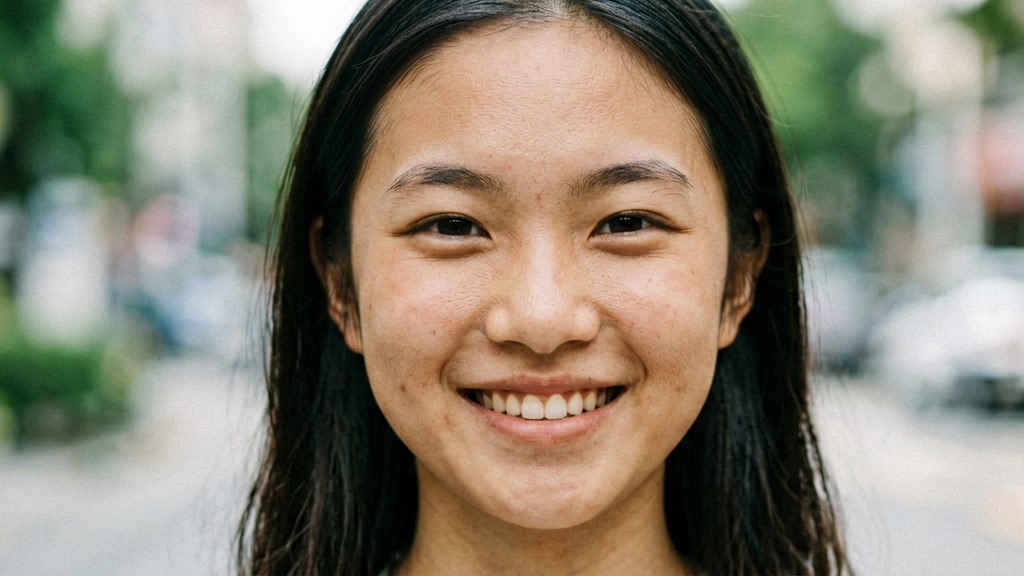
Agnes Image 2.1 Flash 生成的测试图(1024×576),直接保存到博客目录
一、测试说明
今晚测试了 OpenClaw 对接的 Agnes Image 2.1 Flash 文生图模型,看看它的真实水平。用了一段比较标准的人像提示词,跑了1张图,无任何后期处理,直接出片。
二、提示词
photorealistic portrait of a beautiful Chinese girl in her 20s, natural skin texture, visible pores, natural daylight, genuine smile, Canon 5D Mark IV professional photography, f/1.8 aperture, 85mm lens, soft bokeh, high detail, film grain, realistic skin, natural beauty, no makeup look, casual clothing, real person, not CGI
三、评测结果
| 项目 | 评分 | 说明 |
|---|---|---|
| 画面质量 | ★★★★☆ | 1024×576,细节清晰,无可见噪点 |
| 面部精度 | ★★★☆☆ | 五官基本准确,但AI感仍明显,皮肤过于光滑无毛孔 |
| 光影效果 | ★★★★☆ | 自然光感处理不错,有柔和过渡 |
| 背景虚化 | ★★★★☆ | bokeh效果自然,没有明显穿帮 |
| 真实度 | ★★★☆☆ | 远看OK,放大后能看出是AI生成的 |
| 生成速度 | ★★★★★ | 约15-20秒出图,非常快 |
四、完整工作流
Step 1: 确认可用模型
调用 Agnes 的模型列表接口,可用生图模型:agnes-image-2.1-flash 和 agnes-image-2.0-flash。
Step 2: 调用文生图API
POST https://apihub.agnes-ai.com/v1/images/generations
{
  "model": "agnes-image-2.1-flash",
  "prompt": "photorealistic portrait of a beautiful Chinese girl...",
  "n": 1,
  "size": "1024x576",
  "negative_prompt": "cartoon, anime, illustration, painting..."
}
Step 3: 下载到博客目录
不再走Zblog上传接口。直接curl下载PNG,用PIL转JPG,sudo保存到 /www/wwwroot/www_lmwmm_com/zb_users/upload/2026/06/随机数.jpg,Nginx直接提供访问。
curl -sL \"图片URL\" -o /tmp/img.png
python3 -c \"from PIL import Image; Image.open('/tmp/img.png').convert('RGB').save('/tmp/img.jpg', 'JPEG', quality=92)\"
sudo cp /tmp/img.jpg /www/wwwroot/www_lmwmm_com/zb_users/upload/2026/06/d926eaf5611e.jpg
# 直接可访问:https://lmwmm.com/zb_users/upload/2026/06/d926eaf5611e.jpg
Step 4: 发布/更新文章
组装HTML正文(封面图URL指向已保存的路径),用 publish_article.py --update 2440 更新已有文章。
五、总结
Agnes Image 2.1 Flash 在生成速度和分辨率上表现优秀,人像题材整体可用,但细节真实度仍有提升空间。做博客封面图完全够用,追求摄影级品质还需要更好的模型或后期。
综合评分:⭐⭐⭐⭐(4/5)
本文由可亓发布于 lmwmm.com | 技术分享分类 | 测试环境:OpenClaw + Agnes API





 黑公网安备 23010302001359号